Table of Contents
- Training for Last Decade’s Attack
- The Channels That Actually Work Now
- Help Desk Social Engineering
- Why MFA Fatigue Succeeds
- Real-Time Proxy Phishing
- Why Awareness Training Underperforms
- Controls That Do Not Depend on Vigilance
- Reporting Culture Matters More Than Detection Rate
- Common Pitfalls
- Conclusion
- Frequently Asked Questions
Key takeaway: Social engineering succeeded because it moved to channels with no filtering, no reporting mechanism, and no training. The durable answer is authentication that cannot be phished, not better user judgement.
Training for Last Decade’s Attack
The standard awareness programme teaches employees to scrutinise email: check the sender address, hover over links, look for urgency and poor grammar, verify unexpected attachments.
This is reasonable advice about a channel that is now among the better-defended. Email gateways filter aggressively, authentication standards make sender spoofing harder, and users have genuinely internalised suspicion about unexpected attachments.
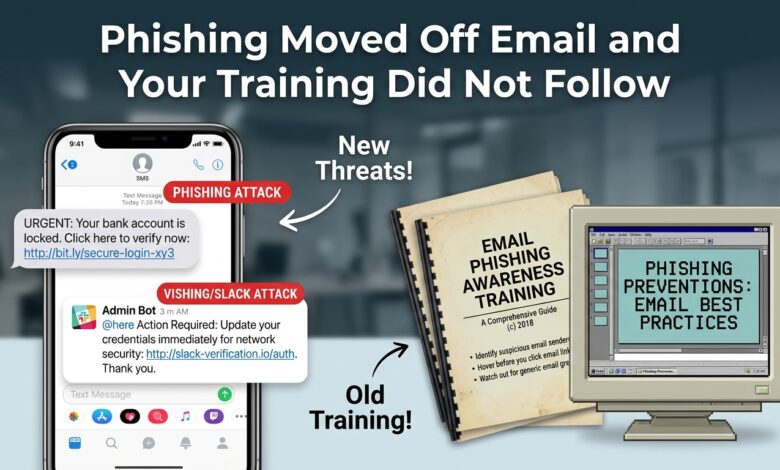
Attackers moved. Successful social engineering now arrives through channels where none of those defences exist: a message in the collaboration platform, an SMS about a delivery, a sponsored search result above the legitimate site, a phone call to the help desk, a push notification at two in the morning.
None of these are covered by email-focused training. Most carry an implicit trust the email channel lost — a message inside the corporate chat tool feels internal, a search result at the top of the page feels authoritative, a phone call feels human and immediate.
The gap is not that users forgot their training. It is that the training described a different problem.
The Channels That Actually Work Now
Collaboration platform messages. Chat tools carry an assumption of internal trust. A message from a compromised colleague account, or from an external user in a shared channel, bypasses the scepticism email now receives. Link filtering in these platforms is generally weaker than in email gateways.
SMS and messaging apps. No filtering, no sender verification, high open rates, and a small screen that hides the full URL. Delivery notifications, bank alerts, and password reset messages are the common pretexts. Because personal phones are frequently outside corporate controls entirely, there is no technical defence at all.
Malicious search advertising. An attacker buys ads for a legitimate software name, and the sponsored result above the genuine one leads to a convincing download page. The user searched deliberately for something they wanted, which removes the suspicion an unsolicited message would trigger. This has proven particularly effective for distributing tooling to technical users.
Voice calls. A call claiming to be from IT support, walking someone through a “security check” that ends with credentials or a code being read aloud. Synthetic voice makes impersonating a specific known person increasingly practical.
Push notification fatigue. Repeated authentication prompts until the target approves one, frequently at an hour when they will do so without reading.
Legitimate service abuse. Phishing pages hosted on well-known cloud platforms, file-sharing services, or form builders. The domain is genuine and reputable, so URL reputation checks pass.
That last technique defeats a large share of technical filtering, because the malicious content sits on infrastructure nobody can afford to block.
Help Desk Social Engineering
The most consequential attack path in many organisations bypasses the user entirely and targets the process for helping users.
The sequence: call the help desk, claim to be an employee locked out, express urgency about a meeting or a deadline, provide identifying information gathered from public sources and previous breaches, and request a password reset or the registration of a new authentication device.
This works because the help desk exists to be helpful, is measured on resolution speed, and faces a genuinely difficult verification problem. The identifying information attackers can obtain — employee identifier, manager’s name, start date, office location — is frequently exactly what the verification script asks for.
Registering a new authentication device is the critical step, because it converts a social engineering call into durable authenticated access that survives password changes.
What actually helps:
Verification that does not rely on knowable facts. Anything findable on a professional network or in a breach dataset is not a secret. Callback to a number in the HR record, or verification through the person’s manager, is substantially stronger.
Manager or security approval for device registration. This specific action deserves a higher bar than any other help desk operation.
A mandatory delay for high-risk requests. Urgency is the attacker’s primary tool. A policy that credential resets take thirty minutes removes it, and it is remarkably effective for how simple it is.
Explicit authority to refuse. Help desk staff measured purely on speed and satisfaction will not push back. Making refusal safe and expected is a management decision rather than a training one.
Out-of-band confirmation for anything unusual. A message to the employee’s known contact method confirming they made the request.
Why MFA Fatigue Succeeds
Push-based multi-factor authentication fails in a way that is entirely a human factors problem.
The attacker has valid credentials. They trigger authentication repeatedly. The target receives notification after notification. Eventually, from confusion, irritation, or a desire to make it stop, someone approves one.
Framing this as user error misdiagnoses it. The system presents a binary choice with no context — approve or deny — at a moment when the user has no way to determine what they are approving. Repeated identical prompts train dismissal, and dismissal eventually means approval.
Number matching mitigates it by requiring the user to enter a value shown on the login screen, which they cannot know unless they initiated the request. This is a real improvement and it remains circumventable when combined with a convincing phone call supplying the number.
The complete answer is phishing-resistant authentication — hardware keys or passkeys — where the credential is cryptographically bound to the legitimate domain. There is no prompt to approve and no code to relay. The attacker’s page cannot obtain a usable credential regardless of what the user does, which removes the human decision from the security boundary entirely.
Real-Time Proxy Phishing
The technique that defeated most multi-factor authentication deployments, and it deserves specific explanation because many teams believe MFA solved phishing.
The attacker operates a reverse proxy between the victim and the genuine site. The victim sees the real login page, because it is the real login page, relayed. They enter their password, which passes through. The genuine site requests a second factor. The victim provides it. The proxy relays that too.
The genuine site authenticates successfully and issues a session token. The proxy captures it. The attacker now holds an authenticated session that does not require re-authentication.
Every code-based second factor falls to this — SMS, authenticator applications, email codes, push approval. Being time-limited and single-use provides no protection, because the attacker uses the code within seconds.
Toolkits automating this are widely available and cheap to operate.
What survives it: phishing-resistant methods bound to the origin. The browser will not release a passkey or security key credential to the proxy’s domain, so there is nothing to relay. This is the reason the distinction between phishing-resistant and code-based MFA matters practically rather than theoretically.
Why Awareness Training Underperforms
Training has a role and is consistently overestimated.
Detection is genuinely difficult. A well-constructed pretext, on a legitimate-looking domain, referencing real internal details, is not reliably distinguishable by a non-specialist. Expecting reliable detection is expecting expert judgement from everyone.
One failure is sufficient. A programme improving detection from 70 to 90 percent still means one in ten attempts succeeds. Across an organisation and a year, that is many successes.
Annual training does not persist. Effect decays within weeks. Frequency matters more than depth.
Simulations frequently measure the wrong thing. Click rate on a simulated email measures susceptibility to that specific simulation. Punitive framing produces concealment rather than caution.
Newer channels are untrained. Training covers email while attacks arrive by chat, SMS, and telephone.
The useful reframing is that training should reduce the frequency of successful attacks and enable fast reporting, while technical controls ensure that a successful attack does not yield usable credentials. Building a security programme on the assumption that users will not be deceived is building on the least reliable available foundation.
Controls That Do Not Depend on Vigilance
Ordered by effectiveness against realistic attacks:
| Control | Defeats | Depends on user judgement |
|---|---|---|
| Passkeys / hardware security keys | Proxy phishing, credential theft, fatigue | No |
| Number matching on push MFA | Fatigue attacks | Partially |
| Conditional access requiring compliant devices | Stolen credentials from unmanaged devices | No |
| Short sessions with continuous evaluation | Stolen session tokens | No |
| Help desk callback verification | Voice social engineering | No |
| Delay on credential reset requests | Urgency-based pressure | No |
| DNS and web filtering | Some malicious domains | No |
| Awareness training | Some attempts | Entirely |
The pattern is worth stating plainly: the effective controls are the ones that do not require a person to make a correct judgement under pressure. Training sits at the bottom of that list not because it is worthless but because it is the only entry that depends entirely on human performance in the moment.
Two additions deserve mention. Restricting who can register new authentication devices, and alerting on every registration, closes the help desk path that converts a phone call into durable access. And blocking newly registered domains — a large share of phishing infrastructure is days old — is a cheap filter with a low false positive rate.
Reporting Culture Matters More Than Detection Rate
The metric most worth improving is time from compromise to report, and it is determined by culture rather than tooling.
A user who clicks a link and enters credentials, then reports it within two minutes, has given the response team a chance to revoke sessions and reset credentials before the attacker acts. The same user who says nothing out of embarrassment has given the attacker hours.
What produces fast reporting: a one-click reporting mechanism in every channel, not only email. Explicit and repeated assurance that reporting a mistake carries no penalty. Visible, prompt acknowledgement so reporting feels useful rather than ignored. And recognition of reports, including false alarms, so people do not calibrate toward silence.
What suppresses it: punitive responses to simulation failures, naming individuals, tying results to performance review, and slow or absent acknowledgement. Organisations that publicly shame simulation clickers reliably destroy their reporting rate, which is the more valuable asset.
Common Pitfalls
Training only on email. Attacks arrive through chat, SMS, search, and telephone.
Treating code-based MFA as phishing-resistant. Proxy toolkits defeat every code-based method.
Help desk verification using knowable facts. Employee details are in breach data and on professional networks.
Punitive simulation programmes. Destroy reporting, which matters more than click rate.
No reporting path outside email. Users cannot report a suspicious SMS through an email button.
Unrestricted device registration. Converts one social engineering call into durable access.
Annual training only. Effect decays in weeks.
Conclusion
Phishing defence built on user vigilance is defence built on the least reliable component. Attacks moved to channels without filtering or training, and real-time proxy toolkits defeated the code-based multi-factor authentication most organisations deployed.
The durable answer is authentication that cannot be phished. Passkeys and hardware security keys are bound to the legitimate domain, so a proxy cannot obtain a usable credential and there is no prompt for a tired user to approve. That single change removes the human judgement from the security boundary.
Around it, harden the help desk with callback verification and delays on credential resets, restrict and alert on authentication device registration, and require compliant devices for sensitive access. Then invest in reporting speed rather than detection rate — because someone will eventually be deceived, and how quickly you learn about it determines the outcome.
Frequently Asked Questions
Is awareness training worthless? No, and it should not be the primary control. It reduces the frequency of successful attempts and builds the reporting habit that limits damage. Expecting it to prevent compromise is unrealistic.
Which MFA method should be used? Passkeys or hardware security keys wherever supported. If codes must be used, number-matched push is preferable to SMS. The distinction between phishing-resistant and code-based is the one that matters.
How can the help desk verify callers reliably? Callback to a number of record, verification through a manager, or a video call for high-risk requests. Knowledge-based verification fails because the knowledge is available to attackers.
Are simulations worth running? Yes, as a measurement and habit-building tool, with non-punitive framing. Report rate is the more useful metric than click rate.
What about attacks on personal devices? Largely outside technical control, which is why phishing-resistant authentication matters — it protects the account regardless of what happens on the device used to attempt access.
How is malicious search advertising defended against? Difficult technically, since the ad platform is legitimate. Distributing software through an internal catalogue rather than having users search for downloads removes the exposure for that category.
Should MFA push notifications be disabled? Where phishing-resistant alternatives are available, migrating away from push is worthwhile. Where push must remain, enable number matching and alert on repeated denied attempts, which is the signature of a fatigue attack in progress.