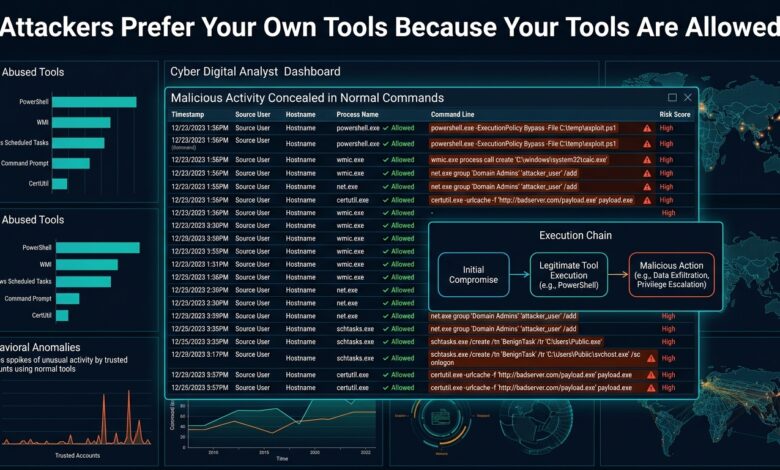
Key takeaway: When the tool is legitimate, only the behaviour is anomalous. Detection has to describe unusual combinations rather than unusual files.
Why Malware Became Optional
Dropping a custom binary means creating a file that antivirus can hash, a vendor can sign as malicious, and an EDR can quarantine. Using powershell.exe avoids all of that — it is signed by the operating system vendor, present on every host, and used constantly by legitimate administration.
The catalogue of abusable built-in utilities is extensive. certutil downloads files. bitsadmin transfers them. regsvr32 and mshta execute remote script. wmic runs commands on remote hosts. rundll32 loads arbitrary libraries. Each has a legitimate purpose, which is precisely why blocking them outright breaks things.
Detecting Behaviour Instead of Files
The signal is never the binary. It is the context around its execution.
| Observation | Suspicion |
|---|---|
winword.exe spawning powershell.exe |
Very high |
certutil with a URL argument |
High |
| PowerShell with encoded command and hidden window | High |
wmic invoking a process on a remote host |
High |
| Base64 in a command line over ~500 characters | High |
powershell.exe from a scheduled task at 03:00 |
Depends on baseline |
Parent-child process relationships carry the most information. Office applications and browsers have no legitimate reason to launch a shell. That single rule catches a substantial share of initial execution and produces very few false positives, which makes it the highest-value detection most organisations can deploy.
Command-line content is the second. Encoded commands, download cradles and execution policy bypass flags appear in attack tooling far more than in administration, and logging full command lines is a prerequisite for seeing any of it.
The Logging Gap
Most environments cannot detect this because the data is not collected. Default Windows auditing does not record command lines, and PowerShell script block logging is off by default.
Three settings change the picture materially: process creation auditing with command line inclusion, PowerShell script block logging, and module logging. Without them, a security team is reasoning about process names alone, which is insufficient by design.
The volume increase is real but manageable, and it is the difference between having evidence and guessing.
Baselining Before Alerting
The reason these detections generate noise is that legitimate administration looks similar. Software deployment tools, monitoring agents and configuration management all invoke the same utilities.
The practical sequence is to run detections in observation mode for several weeks, catalogue what fires and why, then allowlist the specific legitimate sources — this management server, this deployment account, this scheduled task. What remains is small and genuinely interesting.
Allowlist narrowly. Excluding all PowerShell from a server because a monitoring agent uses it removes the detection entirely on that host, which is how coverage gaps form silently.
The Bottom Line
Enable command-line auditing and PowerShell script block logging first, since detection is impossible without them. Then alert on parent-child anomalies and encoded command lines, baseline for several weeks, and allowlist specific legitimate sources rather than whole binaries.