File Uploads Are Remote Code Execution Waiting for a Misconfiguration

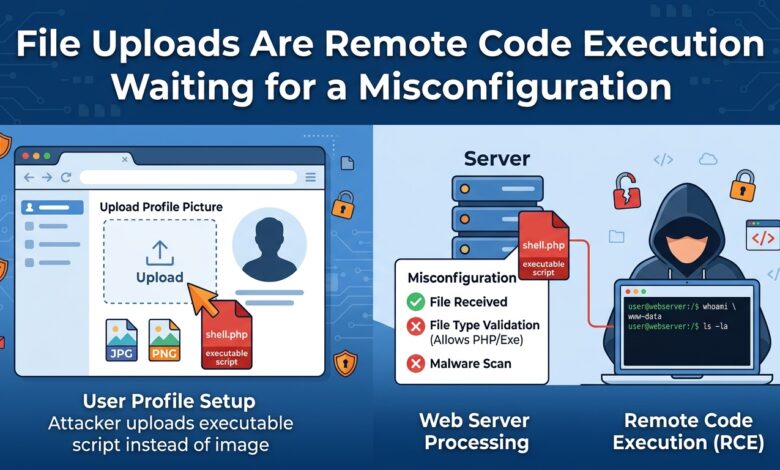
Key takeaway: The danger is not the file’s name or its declared type. It is whether the storage location can execute content and whether downstream processing trusts what it received.
Why Extension Checks Do Not Help
Rejecting anything not ending in .jpg seems reasonable and fails for several reasons at once.
The extension is client-supplied text with no relationship to content. Some servers parse multiple extensions, so shell.php.jpg may still execute. Null bytes and trailing characters have historically truncated names during processing. Case variations and less common executable extensions slip past incomplete lists.
The declared content type header is equally worthless — it is set by the client and can say anything.
Magic byte inspection is better and still insufficient. A valid image file can contain executable code appended after the image data, and a polyglot file is legitimately both formats at once.
What Actually Determines Risk
| Factor | Safe arrangement |
|---|---|
| Storage location | Outside the web root, or object storage |
| Execution capability | Storage that cannot execute anything |
| Served filename | Generated identifier, never client-supplied |
| Serving domain | A separate origin from the application |
| Content type on serve | Set by you, from validated inspection |
| Size limit | Enforced before writing to disk |
Storing uploads in object storage rather than on the application server eliminates the primary risk, because object storage does not execute code regardless of what a file contains. That single architectural choice removes most of the attack surface.
Serving from a separate domain addresses the secondary risk. An HTML or SVG file served from your application’s origin can execute script with access to that origin’s cookies and storage. Served from an unrelated domain, the same file is harmless to your users’ sessions.
Renaming to a generated identifier prevents path traversal in the filename, prevents overwriting existing files, and stops the client controlling anything about how the file is addressed.
The Processing Risk
Uploads are frequently passed to a library for thumbnailing, text extraction or format conversion. Those libraries are large native codebases with a long history of memory safety issues, and they are being handed adversarial input.
The mitigation is isolation rather than trust. Process uploads in a separate sandboxed context with no credentials, no network access and a strict resource limit. A vulnerability in an image parser then yields code execution in a container that can reach nothing.
Resource limits matter independently. A decompression bomb — a small archive expanding to hundreds of gigabytes, or an image declaring enormous dimensions — exhausts memory or disk without any code execution at all.
Additional Controls
Enforce size limits at the proxy before the request body reaches your application, so a large upload cannot consume application resources.
Scan for known malware if users download each other’s files, since your service otherwise becomes a distribution channel.
Validate that authorisation applies to retrieval as well as upload. A file stored with a predictable identifier and served without an access check is a data exposure regardless of how carefully the upload was validated.
The Bottom Line
Store uploads in object storage outside the web root, rename to generated identifiers, serve from a separate origin with a content type you determined, and process files in a sandbox with no credentials or network. Extension and content-type checks are hygiene, not security.